Contents
- The order that matters
- Layer 1 — can Google reach and keep the page?
- Layer 2 — is the page fighting itself?
- Layer 3 — speed on a real Brazilian phone
- Layer 4 — markup that earns something
- Migrations: where sites lose years
- Monitoring after the fix
- What we deliberately ignore
- Writing the ticket a developer accepts
- Frequently asked questions
The order that matters
Technical SEO has a dependency chain, and working out of order wastes months. A page that cannot be crawled will not benefit from faster images. A page that competes with three near-identical URLs will not benefit from better schema. So the sequence is always: reachable, then unique, then fast, then decorated. Everything in a crawl report sorts into one of those four layers, and layers are worked top down.
The practical consequence is that most audits should produce a short list. If the deliverable is a spreadsheet with 800 rows, the analysis has not finished — it has been outsourced to whoever reads it next.
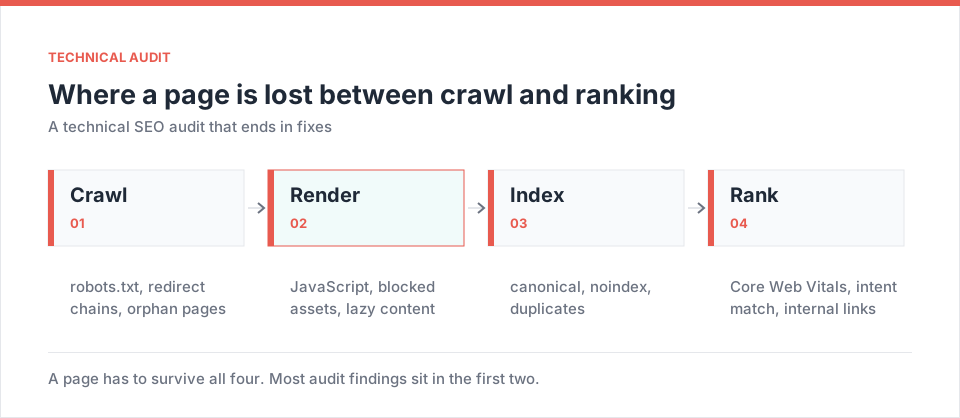
Layer 1 — can Google reach and keep the page?
Start where the losses are total. A page that is not indexed cannot rank at any speed.
- Robots and meta directives. A staging
Disallow: /shipped to production, or anoindexleft in a template, remains the single most expensive bug in this discipline. Check the rendered header, not just the source. - Server responses along the whole path. Chains of 301s through www, non-www, http, https and trailing-slash variants are common on Brazilian sites that have migrated hosting or moved behind a CDN. Collapse them to one hop.
- Sitemaps that tell the truth. Every URL in the sitemap must return 200 and be canonical to itself. A sitemap full of redirects and dead pages teaches Google to trust it less — and we have just spent a network-wide audit proving how quietly this rots.
- Rendering. If the content only exists after JavaScript runs, verify what the crawler actually receives. Store platforms and headless front ends are where this bites.
- Parameters and faceted navigation. Filter combinations on a catalogue can generate thousands of thin URLs. Decide deliberately which are indexable; the default is usually wrong.
Layer 2 — is the page fighting itself?
Once pages are reachable, the next loss is self-inflicted. Three checks catch most of it:
- Canonical hygiene. Every page canonical to itself unless there is a stated reason. Cross-domain canonicals copied from a template are worth searching for explicitly — when a site is cloned from a sibling project, they travel with it.
- Cannibalisation. Two URLs alternating for one query split the signal. The audit lists the pairs; the decision is editorial — merge, differentiate, or redirect.
- Real duplication across properties. If your group runs several city sites, check them against each other, not just internally — the competitor module will happily crawl a sibling domain for this. Text reused with the city name swapped is duplication with extra steps, and it reads as such to a person too.
The hreflang layer belongs here for bilingual Brazilian sites: pt-BR and en pointing at each other, an x-default, and every target returning 200. Broken alternates are silent — nothing in the interface complains.
Layer 3 — speed on a real Brazilian phone
Lab scores measured on office fibre in Faria Lima describe an experience almost none of your visitors have. Test on a mid-range Android over mobile data, and use field data where you have it. Three things dominate the result:
| Symptom | Usual cause | Fix that actually moves it |
|---|---|---|
| Slow first paint | Render-blocking third-party scripts | Defer chat, tag manager, pixels; inline critical CSS |
| Layout jumping | Images and banners without dimensions | Explicit width/height, reserved space for embeds |
| Slow interaction | Heavy JavaScript on the main thread | Split bundles, drop unused libraries, lazy-load below the fold |
One Brazilian specific: chat widgets, marketing pixels and installment calculators tend to accumulate on retail sites until the third-party payload exceeds the site's own. Auditing that list — and deleting what nobody reads reports from — is often the fastest performance win available, and it needs no developer at all.
Layer 4 — markup that earns something
Structured data is the last layer because it amplifies a page that is already correct. Keep it honest and keep it minimal:
- One
BlogPostingorArticleper article, never both, withdatePublishedanddateModifiedthat match what the page shows a human. BreadcrumbListmatching the visible breadcrumb.Productwith price and availability that reflect the page, including installments if you display them.LocalBusinesswith the address, hours and phone as written on the contact page and in the Google Business profile — three sources, one truth.FAQPageonly where the questions are genuinely on the page. Rich results for FAQ are now limited to a narrow set of site types, so treat the markup as machine-readable structure rather than a route to stars in the SERP.
Migrations: where sites lose years of work
Most catastrophic traffic losses we are called in to diagnose are migrations, not penalties. A replatform to VTEX or Nuvemshop, a redesign, a domain consolidation — each one rewrites URLs, and the redirect map is written last, by whoever has time. The checklist that prevents it is short and non-negotiable:
- Inventory before you touch anything. Every indexed URL, its traffic, its position, its inbound links. You cannot redirect what you never listed.
- One hop, one destination. Old URL to the closest equivalent new URL, 301, no chains, no blanket redirect to the homepage. A mass redirect to the root is treated as a soft 404 and loses everything.
- Keep the highest-value pages at the same address where the platform allows it. The cheapest migration risk is the one you decline to take.
- Ship the sitemap on the same day, with the new URLs only, and keep the old sitemap available briefly so discovery is fast.
- Watch daily for a fortnight. Indexed page count, 404 volume in the logs, positions on the top fifty queries. Two weeks of attention buys back months of recovery.
After the fix: monitoring that catches the next one
An audit is a snapshot; sites decay continuously. Four checks, running automatically, catch most of what would otherwise be discovered a quarter late:
| Check | Frequency | Alert when |
|---|---|---|
| Status codes on key templates | Hourly | Anything other than 200 |
| Body content present in the response | Daily | Word count falls below a floor |
| Sitemap URLs resolve and are canonical | Weekly | Any redirect or 404 appears |
| Indexed page count | Weekly | Moves more than 10% without a release |
The second row deserves emphasis, because it is the failure that hides best: a template that renders successfully with an empty body returns 200, looks healthy in every dashboard, and can sit there for weeks. A word-count floor per template is a one-line check that catches it the same day.
What we deliberately ignore
Every crawler emits warnings that do not repay attention. In our practice these stay unfixed unless something else makes them matter: meta keywords, minor heading-order warnings on decorative components, low text-to-HTML ratios on legitimately visual pages, and long-tail image alt text on decorative assets. Saying so explicitly in the audit protects the ten items that do matter from being lost in a list of two hundred.
Writing the ticket a developer accepts
An audit becomes fixes when it stops being a document and starts being tickets. Each one carries the URL pattern affected, the current behaviour, the expected behaviour, the reason in one sentence, and how the fix will be verified. Ten tickets, ordered, with the layer visible — that is a sprint. A PDF with 400 findings is a filing exercise.
The check we run before closing any audit
Fetch ten templates as Googlebot and read what comes back: status, canonical, title, one H1, the markup, and whether the body text is actually in the response. If the body only appears after JavaScript, nothing else in the audit matters yet.
Frequently asked questions
How often should a full audit run?
Continuously for indexing and status checks, quarterly for the full pass, and always immediately after a migration, a redesign or a platform change.
Do Core Web Vitals still decide rankings?
They are a small factor with a large indirect effect: a slow page loses the reader before the content has a chance. Optimise for the reader on mobile data and the metric follows.
How many issues should a first audit fix?
Ten, chosen top down through the four layers. Then measure, then take the next ten. Teams that try to fix everything at once ship nothing and cannot attribute the result.
What is the most common serious problem you find?
Pages that return 200 with no real content — a template rendering an empty body after a database or migration fault. They look healthy in every dashboard and are invisible until someone reads the page.
How does this connect to the rest of the platform?
Priorities come from Analytics, execution of the on-page part from AutoSEO.
Audit in dependency order, cut the list to what a sprint can carry, and write findings as tickets with a verification step. The value is in the sequencing, not the number of checks.
Practical next step
Open your sitemap and request twenty URLs at random. Count how many return something other than 200, and how many are canonical to a different page. That five-minute test predicts the rest of the audit surprisingly well.
Run a Semalt audit →