Contents
Why three tools give three numbers for the same month
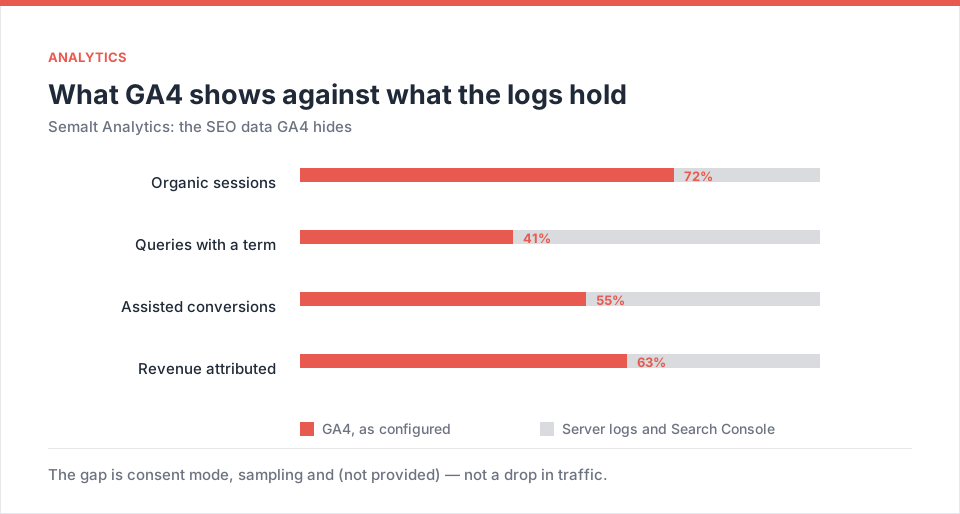
The gap is not a bug in anyone's product — it is three different definitions of the same event. Search Console counts a click when Google hands the user off. GA4 counts a session when its JavaScript executes. Your rank tracker counts a position at the moment it happened to sample. Between the first and the second sits every reader who blocked the script, refused the cookie banner, left before the tag fired on a 4G connection in a lift on Avenida Paulista, or opened the page inside the in-app browser of Instagram, which many Brazilian audiences use as their default web browser.
For content-led Brazilian sites that gap is not a rounding error. In the accounts we run out of São Paulo, the distance between Search Console clicks and GA4 organic sessions has ranged from roughly 15% to well over 60%, widest on sites whose audience skews young, mobile and social-first. Every one of those readers is a real person who read your page and does not exist in the report you send the client.
The second problem is the one that costs money: (not provided). GA4 will tell you a landing page received traffic, but not which query earned it. So the monthly report degrades into page-level storytelling, and nobody can answer the only question the CFO actually asks — which words bring in revenue.
Where Semalt gets its data
Semalt Analytics is not another JavaScript tag competing for the same events. It is a layer that joins three independent sources and reconciles them:
- Search Console API — the full 16-month history at daily granularity, not the truncated top-1,000 view the web interface shows you.
- Server-side collection — a Cloudflare Worker, an Nginx log stream or a single server-rendered line. Because the count happens when the server returns the page, ad blockers and consent rejections do not erase the visit.
- Semalt's own SERP crawl — the same engine behind the rank tracker, so each organic visit is stamped with the position the term actually held that day and the SERP features sitting above it.
That third join is the part no general-purpose analytics product does. Knowing that a page got 400 visits is trivia. Knowing that those 400 visits came from a term sitting in position 6, under an AI Overview and a Mercado Livre listing, on mobile, is a decision.
What GA4 is genuinely good at
- Product and checkout events
- Audience export into Google Ads
- Free at any volume
- Raw export into BigQuery
Where it fails an SEO team
- Queries arrive as (not provided)
- Sampling on high-event properties
- Blind to blocked and refused sessions
- No link between a visit and a position
- No revenue per query, only per channel
Five views you cannot build in GA4
1. Striking distance, sorted by money
Every URL carries the queries that sit in positions 4 to 10 — close enough that a title rewrite, an internal link and a new H2 move them. Semalt orders that list by estimated revenue rather than by search volume (the same logic behind the intent map), which reorders priorities dramatically for Brazilian ecommerce: a term with 90 searches a month and clear purchase intent routinely outperforms a 12,000-a-month head term that Mercado Livre and Shopee already own.
2. Sessions the tag never saw
Log-based collection catches the visits JavaScript missed. Beyond the raw number, the interesting output is the shape: which pages lose the largest share, which devices, which hours. Pages that lose disproportionately are usually heavy, script-dependent templates — and that is a performance bug you can fix, not a measurement quirk you have to explain away.
3. Query × position × device, in one table
CTR by position means nothing as a global average. It means a great deal when you can see that on mobile, for a query where an AI Overview and three sponsored Mercado Livre cards occupy the fold, your position-3 listing behaves like a position-8 listing. That view tells you when to stop chasing rank and start chasing the feature.
4. Revenue tied to the first organic query
Connect the store — VTEX, Nuvemshop, Tray, Loja Integrada, WooCommerce, Shopify — and each order is mapped back to the query that first brought the customer in. For businesses where PIX has pushed conversion up but average order value down, this is the only honest way to compare a high-volume informational term against a low-volume commercial one.
5. Cannibalisation, visible at last
Two URLs alternating for the same term is invisible in GA4, which reports them as two independent pages doing fine. Semalt flags the alternation, shows how many clicks the split costs, and names the URL to consolidate into. On Brazilian sites with years of blog output and overlapping category pages, this is often the single fastest win available.
LGPD: what actually changes for tracking
The Lei Geral de Proteção de Dados (Lei 13.709/2018) does not ban analytics, and it is not the GDPR with different words. What it demands is a lawful basis, a defensible retention period and honesty about what you collect. Two practical consequences for the setup described here:
- Server-side counting is not a loophole — it is a narrower collection. No advertising identifiers, no cross-site profile, pseudonymised at ingest. Document it in your privacy notice in plain Portuguese and keep the retention window short and stated.
- Consent still governs anything that identifies a person. Measuring that a page was served is not the same as building a profile. Keep the two apart in your documentation, and keep your DPO able to explain the difference to the ANPD without opening a dashboard.
Nothing in this article is legal advice; run the final wording past whoever signs off your privacy notice.
Case: an auto parts store in Tatuapé
A parts retailer with a physical counter in Tatuapé and a Tray storefront came to us in February 2026 with a familiar complaint: traffic was flat according to GA4, but the counter staff kept hearing «achei vocês no Google».
- GA4: roughly 38,000 organic sessions in the month, 121 online orders attributed to organic.
- Search Console: about 71,000 clicks over the same window.
- Nobody could explain the difference, so the monthly report simply used whichever number told the better story.
After connecting Semalt Analytics, the reconciled picture was straightforward. Real sessions sat close to the Search Console figure. More usefully, the revenue join showed that a cluster of long-tail fitment queries — part number plus model plus year — carried the majority of orders, while the broad category terms the team had been optimising for months carried almost none, because those SERPs were owned end to end by marketplaces.
The strategy changed in a fortnight: fitment pages generated from the catalogue, one page per part-model-year combination, internally linked from the category. Marketplace-dominated head terms were dropped from the content plan entirely and left to paid.
The lesson generalises across Brazilian retail: when Mercado Livre, Shopee and Magalu hold the head, the winnable market is the specific, the local and the technical — and you cannot see that market at all in a report that hides its queries.
Connecting it in an afternoon
Attach Search Console
An existing property connects on the spot; the 16-month backfill runs in the background while you carry on.
Choose a collection method
Cloudflare Worker, Nginx log shipping, or the standard tag. The Worker route is the one we default to for Brazilian sites behind a CDN.
Join the store or CRM
Native connectors for VTEX, Nuvemshop, Tray, WooCommerce, Shopify and Magento, plus a plain HTTP webhook for anything bespoke.
Historical Search Console data is queryable immediately. Log-based sessions need a full day before the comparison is fair — resist the urge to judge the numbers after two hours.
What to keep GA4 for
| Question you are asking | Best source | Why |
|---|---|---|
| How many people actually read this page? | Semalt | Counted server-side, survives blockers |
| Which query earned this visit? | Semalt | No (not provided); joined to live position |
| What did the checkout funnel do? | GA4 | Event model built for exactly this |
| Which audience do I push into Ads? | GA4 | Native export; Semalt does not replace it |
| Is Google indexing what I published? | Search Console | The authoritative source, always |
| Which words made money last month? | Semalt | Order-level join back to first organic query |
The rule we give clients
Keep GA4 as the product and advertising source. Keep Search Console as Google's own word. Use Semalt for every decision about which page to write, which query to attack, which URL to consolidate and what to tell the board about organic revenue. Three tools, three jobs, one number per question.
Frequently asked questions
Does this replace GA4?
For SEO decisions, yes. For advertising audiences and checkout events, no — keep both, with a clear rule about which answers which question.
Is server-side collection compatible with the LGPD?
It is a narrower form of collection than tag-based tracking: no advertising identifiers, pseudonymised at ingest, configurable retention. That makes compliance easier to document, not automatic — the obligation to declare and justify still sits with you.
How long before it is useful?
The Search Console history is useful in minutes: the striking-distance list is actionable the same afternoon. The session reconciliation needs 24 hours of data before you compare it with GA4.
Does it make sense for a small site?
Yes, and the value is different. Large sites use it to find money; small sites use it to find the two or three pages that are one edit away from page one.
How does it relate to AutoSEO?
Analytics decides what deserves attention, AutoSEO executes the on-page part without waiting for a developer. See the AutoSEO guide, and the technical audit walkthrough for what to fix first.
GA4 was never designed to answer SEO questions, and no amount of custom reporting fixes that. Reconciling logs, queries and positions in one place turns the Monday meeting from an argument about numbers into a decision about pages.
Practical next step
Take last month's report, put the Search Console click total next to the GA4 organic session total, and write down the gap. That number is what this platform exists to explain.
Sign in to Semalt Analytics →